


If you’re already a fan of Google Forms for surveys, registrations, or data collection, big news: Google has a new AI-powered form builder that takes the grunt work out of creating forms — and there’s never been a better time to pair that with seamless payment collection using the Payable Google Forms add-on.
✨ 1. Let AI Kickstart Your Form Creation
Imagine typing a sentence and having a ready-to-edit Google Form appear. That’s the promise of the Gemini AI powered feature in Google Forms. With this tool, you simply enter a prompt (like “Create an RSVP form for a community picnic”), and Gemini will draft a form for you. You can refine the prompt, hit Try Again, and keep iterating until you have exactly the structure you want.
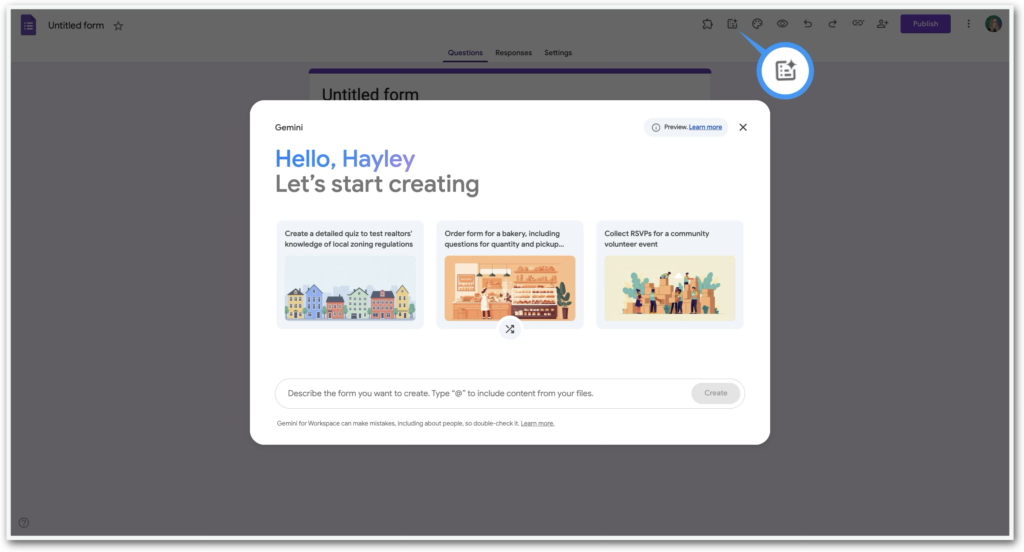
Gemini AI Form Builder
- Generate full form drafts from natural language prompts.
- Use documents in your Google Drive as source inspiration for smarter builds.
- Great for everything from simple surveys to event registrations.
This AI boost dramatically cuts the time from idea to ready-to-share form — no more staring at a blank form wondering where to start!
💡 2. Add Payments Right Inside Your Form
Now here’s where things get even more powerful: combine that AI-generated form with the Payable Forms add-on — and you can accept payments directly through the form.
With Payable:
- 🔒 Users can pay with credit/debit cards, PayPal, Stripe, Square, Apple Pay, Google Pay, and more.
- 💰 The add-on calculates the amount due based on the respondent’s selections.
- 📊 Payment status is automatically logged in the linked Google Sheet, so you can track who paid without manual entry.
- ⚙️ It only takes minutes to set up — install, link a payment provider, and toggle “Make this form Payable.”
Use cases are nearly unlimited: ticket sales, product orders, membership sign-ups, fundraising drives — all with form responses and payment captured in one smooth workflow.
🧠 How These Two Work Together
Gone are the days of chasing after cash, hauling cheques to the bank, or reconciling unidentified electronic payments. With AI generating your form structure and Payable handling the money, what used to require multiple tools can now happen entirely inside Google Forms. That’s a big win in speed, professionalism, and user experience.
No coding. No separate payment pages. Just one form that collects info and money.
Example prompts:
- Workshop registration: Create a professional registration form for a 3-hour in-person marketing workshop. Include fields for full name, email, phone number, company name, dietary restrictions, and accessibility needs. Add a checkbox ticket selection section with Early Bird ($79), General Admission ($99), and VIP ($149, includes front row seating and bonus materials). Include a terms and cancellation agreement checkbox and a short confirmation message thanking them for registering.
- School event ticket sales: Create a ticket order form for a school fundraising carnival. Include parent/guardian name, student name, and grade level. Add a dropdown question to select number of tickets (1–10 tickets at $5 each) and optional add-ons like Meal Voucher ($8) and T-Shirt ($20, sizes S–XL). Include a required agreement to event policies.
- Membership sign-up: Create a membership registration form for a local fitness club. Include personal details (name, email, phone, address, emergency contact), membership type selection (Monthly $49, Quarterly $129, Annual $449), and an optional personal training add-on ($199). Include a waiver agreement checkbox and a short welcome message.
🚀 After Gemini Builds It…
- Review and tweak the questions.
- Install and open the Payable add-on.
- Ensure prices are assigned to the relevant fields.
- Connect your preferred payment processor (Stripe, Square, PayPal, Rapyd, Razorpay).
- Toggle your form to Payable.
- Share and start collecting payments.
See Gemini in action in our short video tutorial –